Visual Wheel Art - Spin & Draw
- 0.0
- Rating
- 100.00K
- Installs
- Free
- Price
 Analysis by App-foxy
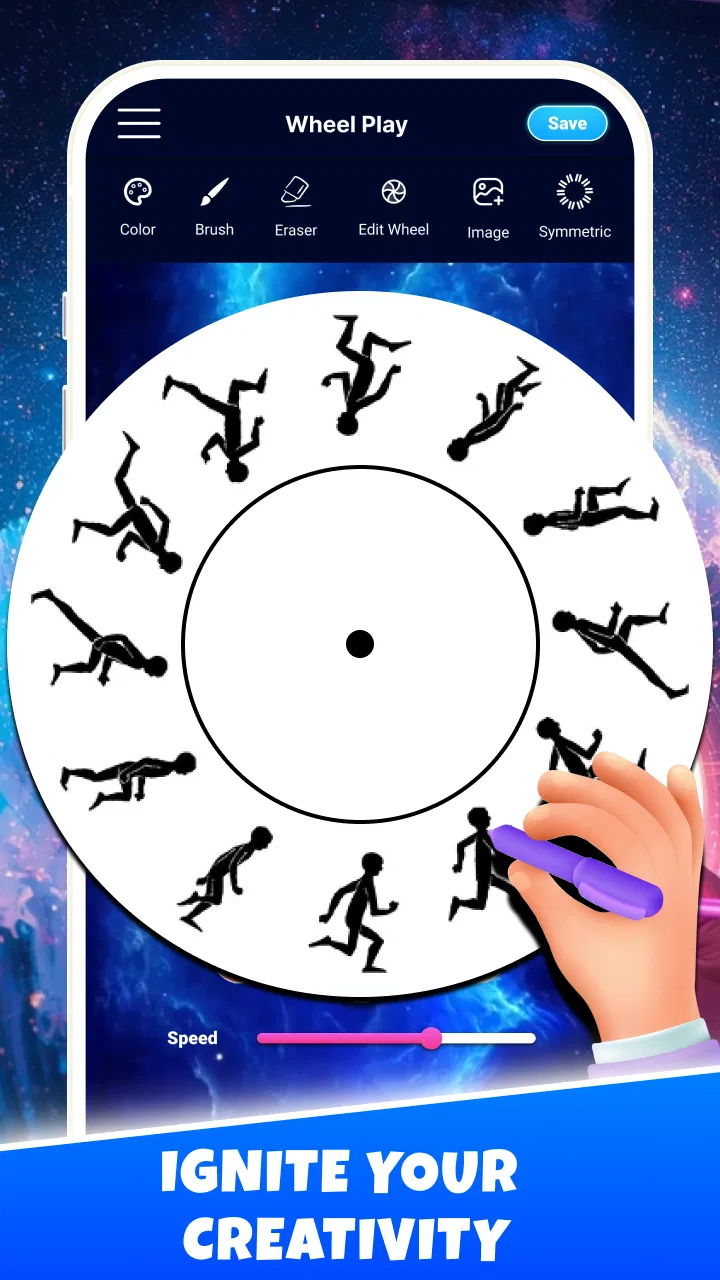
I approached Visual Wheel Art - Spin & Draw as a small creative break rather than a conventional drawing studio. That distinction matters. This free Art & Design app from Neli Creative is built around a visual wheel, spinning motion, and simple mark-making, so the appeal is immediate: open it, draw, let the wheel change the result, and enjoy the process without needing a plan. I found it most interesting when I stopped expecting a polished illustration tool and treated it as a hands-on way to loosen up.
The app is suitable for Everyone, works on Android 9 and later, and its current version is 1.4.1. It was released on March 5, 2026, and has passed 100K+ installs. Those details suggest a product that is easy to try rather than a specialist platform aimed at professional artists. Its average rating is currently 0.0, so I would not use that number as a meaningful guide to quality yet. The practical question is simpler: do you want a focused wheel-art experience, or do you need the layers, brushes, and export control found in a full drawing app?
What to consider before choosing a wheel-art app
My first decision criterion is the kind of creativity I want. If I need to sketch a person, edit a photograph, trace a reference, or prepare a finished graphic, a traditional drawing application is the sensible choice. If I want to make something visually surprising with very little setup, this app has a clearer purpose. It turns the act of drawing into an interaction with rotation, repetition, and chance.
You May Also Like

 Blood Strike: 2.5 Anniversary
Blood Strike’s Loadouts Turn Every Drop Into a Tactical Gamble
A close look at Blood Strike’s custom loadouts: how fast access to signature weapons reshapes its battle royale rhythm, rewards preparation, and narrows the gap between fights.

 Pandora - Music & Podcasts
Pandora’s Music Is Easy to Start, but Harder to Recover
Pandora’s strength is its low-effort path from a seed to a station. Its weak spot is how much confidence it asks you to place in connection, setup, and quiet recovery.

 8 Ball Pool
 Is Built on Rivalries, Rematches, and Routine
A close look at the rivalries, rematches, shared routines, and unanswered safety questions that turn a quick pool match into a persistent mobile community.

 Samsung Music
’s Quiet Strength Is Playing What You Already Own
Its reach comes less from spectacle than from dependable access to a personal library. That simplicity is both the app’s strongest retention engine and its ceiling.

 AccuWeather: Weather Radar
AccuWeather Review: A Quick, Clear Forecast for Everyday Decisions
For everyday plans, the best forecast is the one you can understand quickly. AccuWeather makes rain timing, radar, and local conditions easy to act on, with a few trade-offs.

 Hill Climb Racing
Why Hill Climb Racing Still Turns Crashes Into One More Run
A tiny car, a bumpy hill and one more upgrade: Hill Climb Racing keeps resurfacing because its simple chaos makes every near-miss feel personal.
More From Our News Desk



The second criterion is attention span. I can use it for a short pause between tasks because it does not ask me to build a large project before seeing an effect. That makes it different from a serious illustration workflow, where choosing a canvas, brush, layer structure, and color system can become part of the work. Here, the attraction is the quick feedback loop: make a mark, spin or adjust the visual process, and watch the pattern develop.
I also considered how much control I actually need. Wheel-based art is enjoyable partly because the result is not completely predictable. The same basic gesture can become more decorative when repeated around a center, while a small change in timing or direction can alter the overall appearance. That freedom is useful for experimentation, but it can frustrate anyone who wants every line to land in a precise place.
There is another useful distinction between this app and ordinary fidget tools. A fidget app usually focuses on repetitive touch and immediate sensory feedback, while this experience gives that repetition a visual outcome. I am not only tapping or spinning for its own sake; I am building a pattern while I do it. That extra creative layer is the reason I would choose it over a purely passive distraction.
My first session and the learning curve
My first session felt approachable because the central idea is easy to understand. I did not need drawing experience to begin. The wheel gives the activity a natural focal point, and the connection between a gesture and a repeated visual result becomes clear quickly. I recommend starting with slow, deliberate movements instead of trying to create a complicated design immediately. That makes it easier to see how the wheel responds and prevents the first attempt from becoming a confusing mass of marks.
A useful beginner workflow is to make a few broad strokes, pause, and inspect the balance of the design before adding more. Wheel art can become crowded sooner than expected because repetition multiplies every decision. Leaving open space is not wasted space; it gives the final pattern somewhere to breathe. I found that a restrained first layer often looks more intentional than a screen filled in one continuous session.
The app is also a good place to practice visual rhythm. Rather than aiming for a recognizable object, I tried alternating short and long strokes and then watching how the circular arrangement changed their relationship. This is a more rewarding approach than chasing a perfect picture. It turns the exercise into a lesson in spacing, symmetry, and movement without presenting itself as a formal drawing class.
Where the experience is strongest
The strongest part of this app is its low-pressure creative loop. I can begin without a subject in mind, and the wheel supplies enough structure to prevent the blank-canvas feeling that often stops people from drawing. That makes it especially friendly to casual users, children with supervision appropriate to their situation, and adults who want a calming activity rather than another demanding productivity tool.
I also like the way repetition can make a simple gesture look more deliberate. A basic curve or line gains a decorative quality when it is distributed around the wheel. This is the kind of result that can feel satisfying even when the person using the app does not consider themselves artistic. The visual payoff arrives through the process, not through technical skill.
In my experience, the most effective use is short, focused sessions. I might open it after a long stretch of reading, use it while waiting for an appointment, or reach for it when I want to step away from a stressful conversation without scrolling through social media. A realistic everyday scenario would be a ten-minute evening reset: I start with a simple pattern, keep the movements slow, and stop when the design feels balanced. The point is not to produce a masterpiece; it is to give my attention one gentle, contained task.
The wheel also creates a useful compromise between control and surprise. I still choose where and how I draw, but I do not have to manually construct every repeated element. That makes the app feel more playful than a standard brush canvas. For someone who enjoys generative-looking patterns but does not want to learn a complex design program, this is a meaningful advantage.
Three practical techniques that improve the results
My first tip is to treat the center as a visual anchor. Before adding detail, I make a simple arrangement that establishes the direction of the piece. If the initial marks are too dense or uneven, later repetition tends to emphasize the problem. A sparse foundation gives me more room to adjust the mood of the design.
My second tip is to change one variable at a time. When experimenting, I avoid making a new gesture, changing the pace, and adding extra detail all at once. Keeping the process controlled helps me understand which action created the effect I like. This is especially valuable for beginners because wheel art can otherwise feel random rather than responsive.
My third tip is to stop earlier than instinct suggests. Circular patterns can lose their clarity when every attractive gap is filled. I often prefer the version just before the final additions. This is a non-obvious strength of the format: because the app encourages repetition, learning when not to repeat becomes part of using it well.
I would also use it as a warm-up before moving to a more demanding art project. Making a few wheel patterns can help me think about balance and repetition before I open a conventional canvas. In that role, it is not competing directly with a professional drawing app; it is preparing my eyes and hands for one.
Where the app may not be the right fit
The same simplicity that makes the experience welcoming limits its usefulness for finished artwork. If my goal is a detailed portrait, a carefully edited illustration, a logo with exact geometry, or a project that needs a predictable layer-based workflow, I would choose a dedicated drawing or design application instead. The wheel is central to the experience, so users who want ordinary freehand drawing may feel constrained rather than inspired.
I would also skip it if I need a serious tool for an ongoing creative project. A professional workflow depends on repeatable control, clear organization, and the ability to revise individual decisions without disturbing the rest of the image. The appeal here comes from the immediate visual process, not from managing a complex production pipeline.
Another limitation is subjective but important: not everyone finds repetition relaxing. Some people may enjoy the spinning motion and patterned output, while others may find the circular structure visually busy or monotonous after a few sessions. I would not recommend it solely because it is labeled as stress relief. The calming effect depends on whether the combination of drawing and motion suits the individual user.
It is also worth being realistic about motivation. The app can help me start creating, but it does not replace learning fundamentals such as perspective, anatomy, color theory, or composition in a broader sense. It offers a narrow, enjoyable playground. That is a strength for a quick activity and a weakness for anyone expecting a complete art education.
How it compares with familiar alternatives
Compared with a blank-canvas drawing app, this experience removes much of the initial decision-making. A blank canvas offers more freedom, but that freedom can become a barrier when I do not know what to draw. The wheel gives me a starting structure and makes repetition part of the design. I would choose the blank canvas for intentional illustration and this app for spontaneous pattern-making.
Compared with coloring applications, the difference is active creation. Coloring starts with an existing outline and asks me to fill it with choices. Here, I create the marks themselves and see them transformed by the wheel. Someone who wants a quiet, guided activity may prefer coloring; someone who wants to see a personal gesture become a pattern may find this more engaging.
Compared with standalone fidget applications, the advantage is a visible creative result. A fidget tool can be excellent when I only want tactile repetition, but this app gives the repetition a destination. On the other hand, a dedicated fidget app may be better for users who want the simplest possible interaction and do not care about making images.
Compared with generative art tools, this app feels more direct and less technical. I do not need to think in terms of elaborate parameters or procedural systems to get an interesting result. That accessibility is valuable, although users who want precise algorithmic control will likely outgrow it quickly. The choice comes down to whether I want to guide a playful process or engineer a repeatable visual system.
Free access and the practical cost of switching
The app is free, which lowers the barrier to testing it. I can try the central idea without committing money, and that matters for an experience whose appeal is personal. Some users will immediately enjoy the combination of spinning and drawing; others will know within a short session that they prefer ordinary sketching or passive relaxation.
The real cost of switching is not financial in this case; it is workflow and expectation. If I move from a full drawing app to this one, I give up the familiar precision of a general-purpose canvas in exchange for a more focused activity. If I move in the opposite direction, I gain control but also take on more decisions. I would not replace one with the other. I would keep this app for quick pattern experiments and use a broader tool when the result needs to be edited carefully.
Because it supports Android 9 and later, compatibility should be straightforward for many Android users with reasonably recent devices. I would still think about the screen size and touch comfort of the device I plan to use. Wheel art benefits from seeing the whole composition, so a cramped display may make the experience less satisfying than a larger phone or tablet screen.
The Everyone age rating also fits the uncomplicated creative concept. Even so, I would judge the app by the needs of the person using it rather than by the label alone. A young user may enjoy the immediate patterns, while an older beginner may appreciate that the activity does not demand drawing knowledge. In both cases, the best results come from treating it as experimentation rather than a test of artistic ability.
Who I would recommend it to
I would recommend this app to anyone who wants a quick creative distraction with a clear visual identity. It is a particularly good match for people who like symmetry, repeated patterns, doodling, or the satisfaction of watching simple actions produce a richer image. It may also suit users who feel intimidated by traditional art software and want a gentler first step.
I would recommend it to teachers, parents, or activity planners only when the goal is open-ended visual play rather than a structured lesson. The wheel can prompt conversations about repetition, balance, and pattern, but the experience should not be presented as a replacement for broader art materials. Its value is in inviting participation quickly.
I would skip it if my main reason for downloading an art app is to create polished illustrations, retouch images, or maintain a detailed project over time. I would also skip it if I dislike motion-based interactions or if I need every visual element to remain under exact manual control. In those situations, a conventional sketching, painting, or design tool will be a better fit from the beginning.
My recommendation after using it
Visual Wheel Art - Spin & Draw succeeds because it knows what kind of experience it wants to be. It is not trying to replace a complete drawing studio. Instead, it gives me a compact way to draw, experiment with repetition, and use spinning motion as part of the creative process. That focus makes it approachable and gives it a distinct reason to exist among broader art apps.
My honest recommendation is to try it when I want low-pressure pattern-making, a brief mental reset, or a playful introduction to visual symmetry. I would keep expectations modest: the experience is strongest as a creative fidget and warm-up, not as a professional illustration solution. The free price makes that decision easy, and the current version gives Android users a straightforward opportunity to see whether the wheel-based approach matches their taste.
For me, the deciding question is not whether it offers more tools than a traditional drawing app. It does not need to. The better question is whether I want control over every line or whether I want to participate in a process that can surprise me. When I choose the second option, this app delivers a pleasant, focused activity. When I need precision, editing depth, or a finished commission, I would switch to something broader without hesitation.
FAQs for Visual Wheel Art - Spin & Draw
01What is Visual Wheel Art - Spin & Draw?
Visual Wheel Art - Spin & Draw is a creative application that allows users to produce stunning artwork using a spinning wheel mechanism. By choosing colors and adjusting the speed and direction of the spin, users can create unique and vibrant patterns. It's designed for both beginners and experienced artists looking to experiment with digital art.
02Is Visual Wheel Art - Spin & Draw available on both Android and iOS?
Yes, Visual Wheel Art - Spin & Draw is available for download on both Android and iOS platforms. The app provides a seamless experience across devices, allowing you to enjoy creating art on your smartphone or tablet. Check the app store on your device for compatibility details and download options.
03Does Visual Wheel Art - Spin & Draw require an internet connection?
No, Visual Wheel Art - Spin & Draw does not require an active internet connection to use its core features. You can create and save your artwork offline. However, for accessing online galleries, sharing your creations, or downloading updates, an internet connection will be necessary.
04Are there any in-app purchases or subscriptions in Visual Wheel Art - Spin & Draw?
Visual Wheel Art - Spin & Draw offers a variety of features for free, but it may include optional in-app purchases. These could range from additional color palettes or brushes to premium templates. While the app is fully functional without purchases, these options can enhance your creative experience.
05Is Visual Wheel Art - Spin & Draw suitable for children?
Yes, Visual Wheel Art - Spin & Draw is suitable for users of all ages, including children. The app offers an intuitive interface that is easy to navigate, making it accessible for young users. Parents might appreciate the app's ability to foster creativity and artistic skills in their children.
Pros
- Intuitive interface for easy drawing
- Variety of color options available
- Supports high-resolution outputs
- Regular updates with new features
- Low battery consumption during use
Cons
- Limited free templates available
- No offline mode for drawing
- Ads can be intrusive at times
- Requires high-performance device
- Tutorials are somewhat basic

Visual Wheel Art - Spin & Draw
Gallery